Automating Your Old New York City Apartment Doorbell
All my apartments in New York City have had the same buzzer, one of those little white TekTone units. Sue me, I like cheap apartments. Since getting my first place, I’ve wondered: how can I let people in without being home, and without having to get up and buzz them in?
I stumbled upon this article by Chris Whong which set me on my way. Thanks Chris, you’re the best.
What You’ll Need
- Home Assistant
- MQTT broker
- Automation 2040W Mini (Raspberry Pi Pico W)
Understanding the Wiring
Chris had some very helpful diagrams showing how these buzzers work:
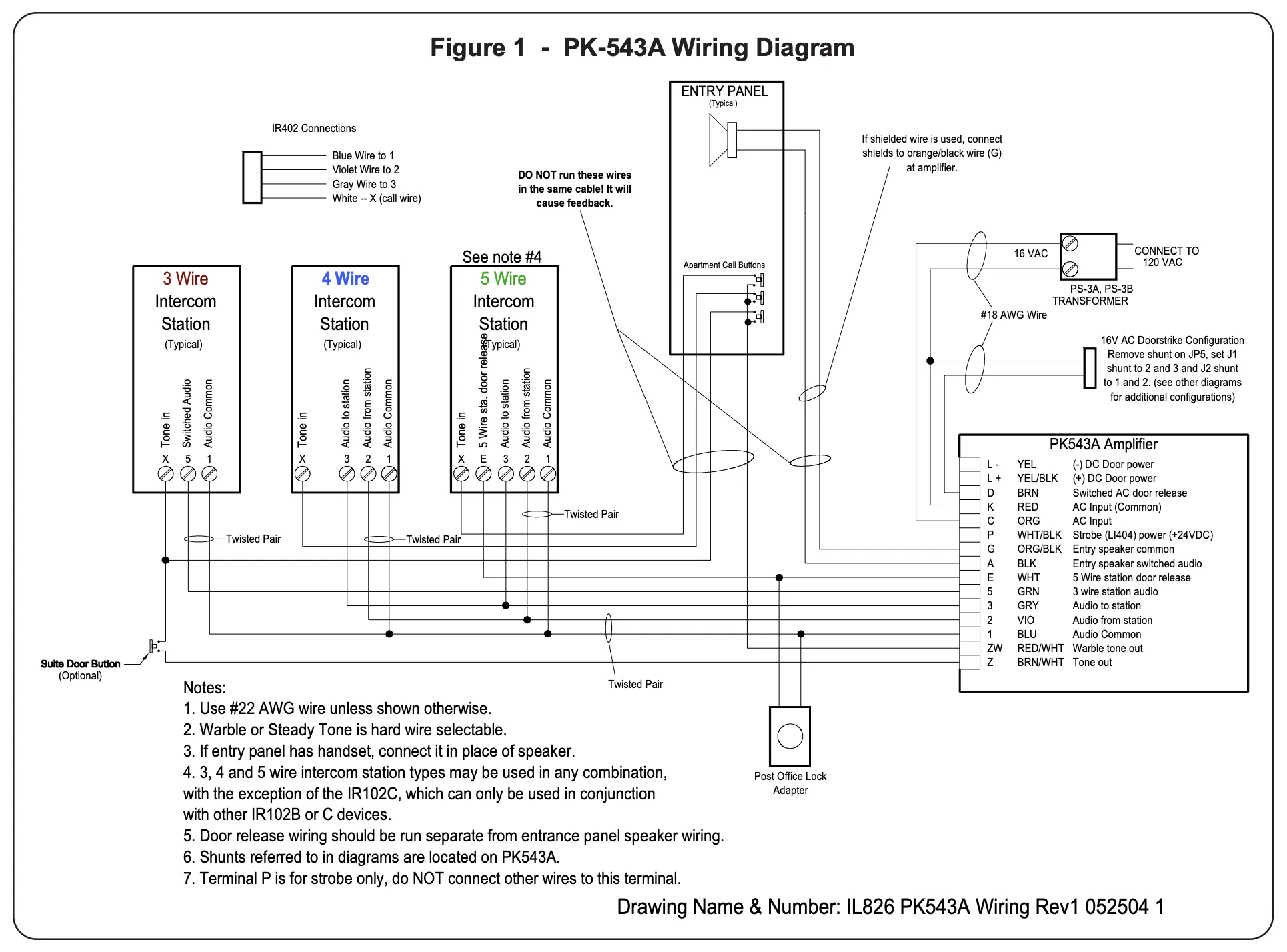
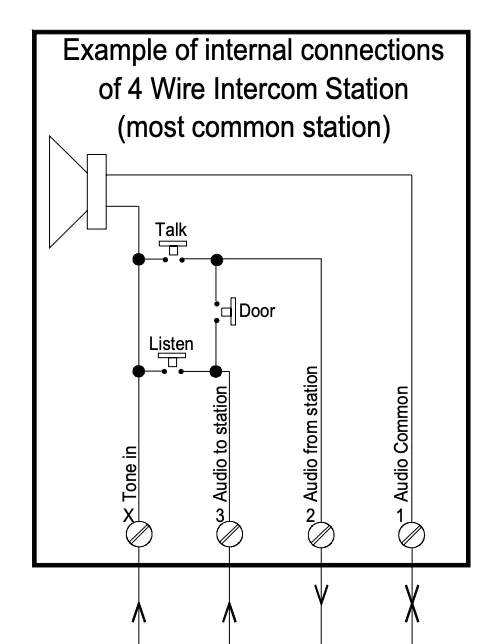
The Hardware Solution
After studying the diagrams, I needed something to actually wire this up. I found this Raspberry Pi forum thread which pointed me to the right board.
I ended up buying an Automation 2040W Mini from PiShop.
The solution was pretty simple, though knowing absolutely nothing about this stuff made it hard. These boards are nice because they have a 40V input, which roughly affords you 20-ish volts of AC current or 40V DC (AC is a sine wave so you get half).
Now, someone with an electrical engineering degree will probably say “hey now, those ADCs are for DC current” to which I’ll reply: it doesn’t really matter.
These boards are much too power-hungry to be battery powered, so you’re going to end up having them plugged in all the time. What this means is you can just sample fast enough to read the sine wave for AC inputs.
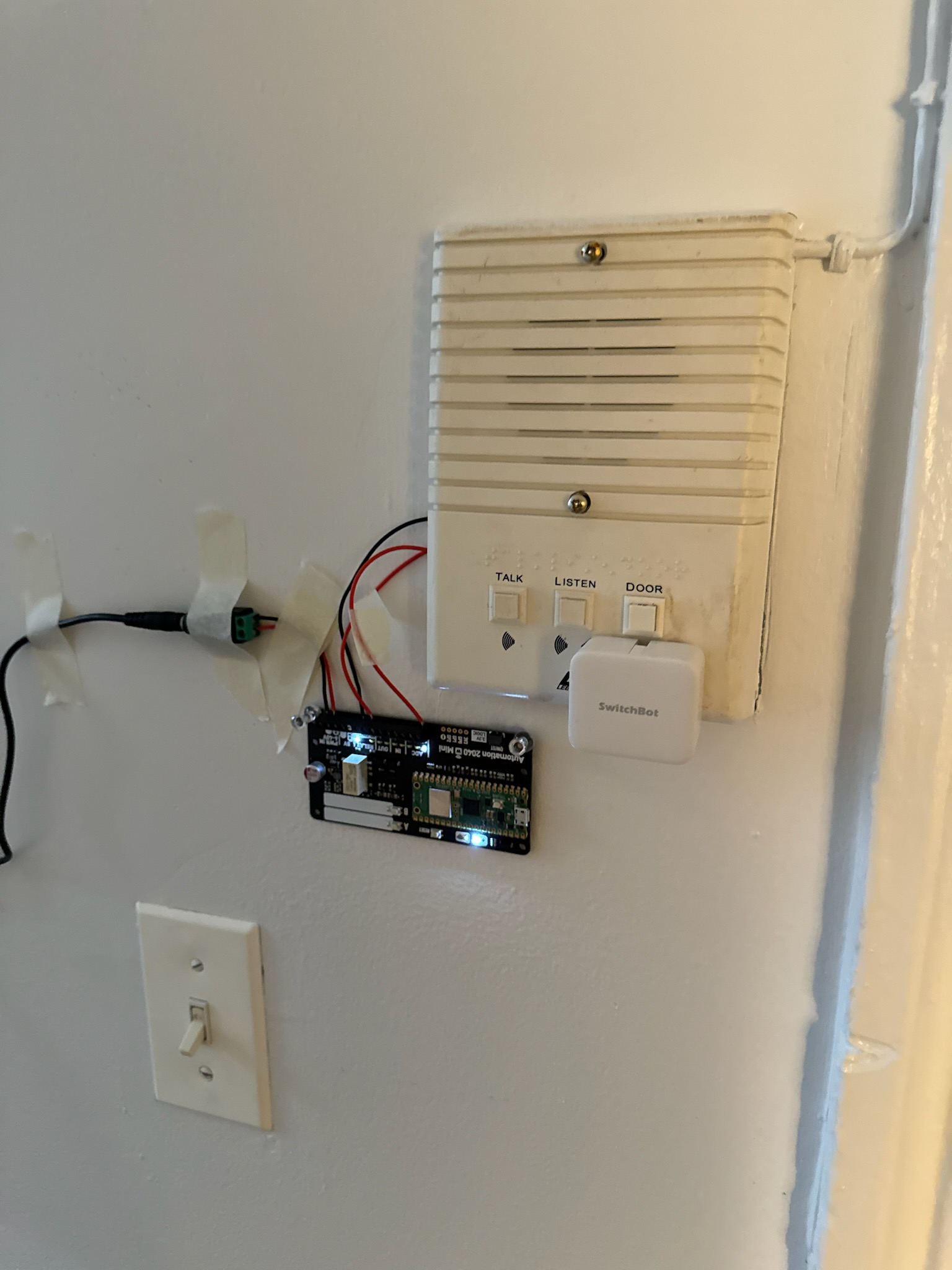
The Wiring
Reading the input is straightforward. You need to connect:
Tone In(X) → ADC InputAudio Common - Ground(1) → A spare ground on your board (I used one of the 5V grounds)Audio to Station(3) → RELAY NOAudio From Station(4) → RELAY COM
You’ll also need to power the board with a DC input anywhere between 6V-40V. I used a small 20W USB-C brick, a USB-C to USB-C cable, a USB-C female power delivery to barrel adapter, and then a barrel connector with pigtails at the end. There’s definitely a way to simplify this power chain, but it works.
The Code
The code is pretty simple (don’t judge, it worked flawlessly). A lot of it was written out of paranoia that the door would get stuck in the “ON” position.
Here’s the original code:
import network
import json
import time
from machine import WDT
from umqtt.robust import MQTTClient
from automation import Automation2040WMini
from secrets import SECRET_WIFI_PASSWORD
STAT_OK = network.STAT_GOT_IP


WIFI_SSID = '--------'
WIFI_PASSWORD = SECRET_WIFI_PASSWORD

MQTT_BROKER = '192.168.1.93'
MQTT_PORT   = 1883

BASE_TOPIC_SENSOR = "homeassistant/sensor/doorbell"
BASE_TOPIC_SWITCH = "homeassistant/switch/doorbell"

PAYLOAD_AVAILABLE   = "online"
PAYLOAD_UNAVAILABLE = "offline"

ADC_VOLTAGE               = 6.0
BUZZ_TIME_MS              = 1500
DEF_RING_SENSOR_COOLDOWN_MS = 1000.0

WDT_TIMEOUT       = 3000
RECONNECT_DELAY_S = 5


sensor_config = {
    "name": "Doorbell Sensor",
    "state_topic": BASE_TOPIC_SENSOR + "/detect",
    "payload_on": "ON",
    "payload_off": "OFF",
    "unique_id": "doorbell_sensor_home",
    "availability_topic": BASE_TOPIC_SENSOR + "/availability",
    "payload_available": PAYLOAD_AVAILABLE,
    "payload_not_available": PAYLOAD_UNAVAILABLE
}

switch_config = {
    "name": "Doorbell Switch",
    "command_topic": BASE_TOPIC_SWITCH + "/command",
    "state_topic": BASE_TOPIC_SWITCH + "/state",
    "payload_on": "ON",
    "payload_off": "OFF",
    "unique_id": "doorbell_switch_home",
    "availability_topic": BASE_TOPIC_SWITCH + "/availability",
    "payload_available": PAYLOAD_AVAILABLE,
    "payload_not_available": PAYLOAD_UNAVAILABLE,
    "retain": False
}


class AutomationBoard:
    def __init__(self, mqtt_client):
        self.board = Automation2040WMini()
        self.mqtt_client = mqtt_client
        self.is_sensor_activated = False
        self.cooldown_time = None
        self.wdt = WDT(timeout=WDT_TIMEOUT)

    def activate_relay(self):
        print("Activating Relay")
        self.board.actuate_relay()
        time.sleep_ms(BUZZ_TIME_MS)
        print("Releasing Relay")
        self.board.release_relay()
        self.board.reset()

    def on_message(self, topic, msg):
        if topic == b'homeassistant/status' and msg == b'online':
            print("HA restarted – re-publishing discovery")
            publish_configs(self.mqtt_client)
            set_availability_online(self.mqtt_client)
            set_initial_state(self.mqtt_client)
            return
        print("Received Topic")
        print((topic, msg))
        if topic == b'homeassistant/switch/doorbell/command':
            if msg == b'ON':
                print("-----------------")
                print("Setting Doorbell State ON")
                self.mqtt_client.publish(BASE_TOPIC_SWITCH + "/state", "ON")
                self.activate_relay()
                print("Setting Doorbell State OFF")
                print("-----------------")
                self.mqtt_client.publish(BASE_TOPIC_SWITCH + "/state", "OFF")

    def listen_for_adc(self):
        voltage = self.board.read_adc(0)

        if voltage >= ADC_VOLTAGE:
            if self.is_sensor_activated:
                return

            if self.cooldown_time is not None and \
               time.ticks_diff(time.ticks_ms(), self.cooldown_time) < DEF_RING_SENSOR_COOLDOWN_MS:
                return

            self.cooldown_time = None
            print("Received Voltage Over: " + str(ADC_VOLTAGE))
            print("Sensor is now on")
            print(voltage)
            self.is_sensor_activated = True
            self.mqtt_client.publish(BASE_TOPIC_SENSOR + "/detect", "ON")

        else:
            if self.is_sensor_activated:
                print("Received low voltage, deactivating sensor")
                self.is_sensor_activated = False
                self.mqtt_client.publish(BASE_TOPIC_SENSOR + "/detect", "OFF")
                self.cooldown_time = time.ticks_ms()


def connect_wifi(ssid, password, *, timeout_s=15, wdt=None):
    print("-----------------")
    print("Attempting To Connect to WiFi...")
    wlan = network.WLAN(network.STA_IF)
    wlan.active(True)
    wlan.connect(ssid, password)

    start = time.time()
    while not wlan.isconnected():
        if wdt:
            wdt.feed()
        if time.time() - start > timeout_s:
            raise RuntimeError("WiFi connect timeout")
        time.sleep_ms(250)

    print("Connected to WiFi :", wlan.ifconfig()[0])
    print("-----------------")
    return wlan


def sleep_with_feed(seconds, wdt):
    """Sleep in 100-ms steps so the watchdog is always fed."""
    end = time.ticks_add(time.ticks_ms(), int(seconds * 1000))
    while time.ticks_diff(end, time.ticks_ms()) > 0:
        wdt.feed()
        time.sleep_ms(100)


def connect_mqtt():
    print("-----------------")
    print("Attempting To Connect to MQTT...")
    client = MQTTClient("doorbell_home", MQTT_BROKER, port=MQTT_PORT)
    client.connect()
    print("Connected to MQTT")
    print("-----------------")
    return client


def publish_configs(mqtt):
    mqtt.publish(BASE_TOPIC_SENSOR + "/config",
                 json.dumps(sensor_config), retain=True)
    mqtt.publish(BASE_TOPIC_SWITCH + "/doorbell/config",
                 json.dumps(switch_config), retain=True)


def reconnect_mqtt(client, board):
    """Block until MQTT link is up again, then resubscribe."""
    while True:
        try:
            print("Re-connecting to MQTT …")
            client.connect(False)
            client.set_callback(board.on_message)
            print("-----------------")
            print("Subscribing to doorbell switch command")
            client.subscribe(BASE_TOPIC_SWITCH + "/command")

            print("-----------------")
            print("Subscribing to home assistant status")
            client.subscribe("homeassistant/status")
            publish_configs(client)
            set_availability_online(client)
            print("MQTT re-connected and resubscribed")
            return client
        except Exception as e:
            print("MQTT reconnect failed:", e)
            time.sleep(RECONNECT_DELAY_S)


def startup(mqtt_client, board):
    print("-----------------")
    print("ADC VOLTAGE: " + str(ADC_VOLTAGE))
    print("-----------------")
    print("Publishing Configs")
    publish_configs(mqtt_client)

    print("-----------------")
    print("Setting Callback on Switch")
    mqtt_client.set_callback(board.on_message)

    print("-----------------")
    print("Subscribing to doorbell switch command")
    mqtt_client.subscribe(BASE_TOPIC_SWITCH+"/command")

    print("-----------------")
    print("Subscribing to home assistant status")
    mqtt_client.subscribe("homeassistant/status")

    print("-----------------")
    print("Setting Availability: Online")
    set_availability_online(mqtt_client)

    print("-----------------")
    print("Set Last Will and Testimony")
    set_last_will(mqtt_client)

    print("-----------------")
    print("Publish Initial State for Ring Detection and Switch")
    set_initial_state(mqtt_client)
    print("Board is now on and listening")


def set_availability_online(mqtt_client):
    mqtt_client.publish(BASE_TOPIC_SWITCH+"/availability", PAYLOAD_AVAILABLE)
    mqtt_client.publish(BASE_TOPIC_SENSOR+"/availability", PAYLOAD_AVAILABLE)


def set_initial_state(mqtt_client):
    mqtt_client.publish(BASE_TOPIC_SENSOR+"/detect", "OFF")
    mqtt_client.publish(BASE_TOPIC_SWITCH+"/state", "OFF")


def set_last_will(mqtt_client):
    mqtt_client.set_last_will(
        BASE_TOPIC_SWITCH+"/state", "OFF")
    mqtt_client.set_last_will(
        BASE_TOPIC_SENSOR+"/detect", "OFF")
    mqtt_client.set_last_will(
        BASE_TOPIC_SWITCH+"/availability", PAYLOAD_UNAVAILABLE)
    mqtt_client.set_last_will(
        BASE_TOPIC_SENSOR+"/doorbell/availability", PAYLOAD_UNAVAILABLE)


def cleanup(mqtt_client):
    mqtt_client.publish(
        BASE_TOPIC_SWITCH+"/availability", "offline")
    mqtt_client.publish(
        BASE_TOPIC_SENSOR+"/availability", "offline")
    mqtt_client.disconnect()


def main():
    wlan         = connect_wifi(WIFI_SSID, WIFI_PASSWORD)
    mqtt_client  = connect_mqtt()
    board        = AutomationBoard(mqtt_client)

    try:
        startup(mqtt_client, board)

        while True:
            board.wdt.feed()

            if wlan.status() != STAT_OK:
                print("Wi-Fi dropped – trying to reconnect …")
                try:
                    wlan.disconnect()
                    wlan.active(False)
                except Exception:
                    pass
                time.sleep_ms(500)
                try:
                    wlan = connect_wifi(WIFI_SSID, WIFI_PASSWORD,
                                        wdt=board.wdt)
                except Exception as e:
                    print("Wi-Fi reconnection failed:", e)
                    sleep_with_feed(RECONNECT_DELAY_S, board.wdt)
                    continue

            try:
                mqtt_client.check_msg()
            except OSError as e:
                print("MQTT lost:", e)
                try:
                    mqtt_client.disconnect()
                except Exception:
                    pass
                mqtt_client = reconnect_mqtt(mqtt_client, board)
                board.mqtt_client = mqtt_client

            board.listen_for_adc()

    except Exception as e:
        print("Error:", e)
    finally:
        cleanup(mqtt_client)


main()
The Updated Version
Since moving apartments, things got a bit unreliable with my new buzzer. The latest code adds auto-calibration for the voltage threshold, better logging, and configurable parameters via Home Assistant:
import network
import json
import time
from machine import WDT
from umqtt.robust import MQTTClient as RobustMQTTClient
from automation import Automation2040WMini
from secrets import SECRET_WIFI_PASSWORD

STAT_OK = network.STAT_GOT_IP

WIFI_SSID = '--------'
WIFI_PASSWORD = SECRET_WIFI_PASSWORD

MQTT_BROKER = '192.168.1.93'
MQTT_PORT   = 1883

BASE_TOPIC_SENSOR = "homeassistant/sensor/doorbell"
BASE_TOPIC_SWITCH = "homeassistant/switch/doorbell"
BASE_TOPIC_LOG    = "homeassistant/sensor/doorbell_log"
BASE_TOPIC_VOLT   = "homeassistant/sensor/doorbell_voltage"

CFG_RUNTIME_BASE     = "doorbell/config"
CFG_DISCOVERY_BASE   = "homeassistant/number/doorbell"
CFG_SELECT_DISCOVERY = "homeassistant/select/doorbell"

CFG_ADC_MODE_STATE      = CFG_RUNTIME_BASE + "/adc_mode/state"
CFG_ADC_MODE_SET        = CFG_RUNTIME_BASE + "/adc_mode/set"
CFG_ADC_THRESHOLD_STATE = CFG_RUNTIME_BASE + "/adc_threshold/state"
CFG_ADC_THRESHOLD_SET   = CFG_RUNTIME_BASE + "/adc_threshold/set"
CFG_ADC_MARGIN_STATE    = CFG_RUNTIME_BASE + "/adc_margin/state"
CFG_ADC_MARGIN_SET      = CFG_RUNTIME_BASE + "/adc_margin/set"
CFG_COOLDOWN_STATE      = CFG_RUNTIME_BASE + "/cooldown_ms/state"
CFG_COOLDOWN_SET        = CFG_RUNTIME_BASE + "/cooldown_ms/set"
CFG_BUZZ_STATE          = CFG_RUNTIME_BASE + "/buzz_ms/state"
CFG_BUZZ_SET            = CFG_RUNTIME_BASE + "/buzz_ms/set"

ADC_VOLTAGE_DEFAULT        = 0.12
ADC_MARGIN_DEFAULT         = 0.03
DEFAULT_COOLDOWN_MS        = 1000.0
DEFAULT_BUZZ_TIME_MS       = 1500
VOLTAGE_REPORT_INTERVAL_MS = 5000
LOG_MIN_INTERVAL_MS        = 1000
ADC_DEBUG_INTERVAL_MS      = 1000
BASELINE_ALPHA             = 0.01
PRESS_MIN_MS               = 50

WDT_TIMEOUT       = 3000
RECONNECT_DELAY_S = 5

CONFIG_FILE = "doorbell_config.json"

DEFAULT_CONFIG = {
    "adc_mode": "auto",
    "adc_voltage": ADC_VOLTAGE_DEFAULT,
    "adc_margin": ADC_MARGIN_DEFAULT,
    "cooldown_ms": DEFAULT_COOLDOWN_MS,
    "buzz_ms": DEFAULT_BUZZ_TIME_MS,
}
The full updated code is much longer with all the auto-calibration and MQTT configuration features, but the core idea remains the same: read the ADC, detect when someone buzzes, and let Home Assistant know.
This code simply needs to be dragged and dropped into the Automation PI 2040. Connecting is pretty simple. I used a micro usb -> usbc cable and the Thonny IDE. Once it’s dropped in, you can start it using the IDE or just restart the board. As long as your MQTT broker location is set up correctly in your code, MQTT will discover the topics when they get a message and Home Assistant SHOULD be able to auto add the entities using auto discovery.
Results
Now I can:
- Get notified on my phone when someone buzzes
- Let people in remotely from anywhere
- Set up automations (like auto-buzzing in expected guests)
The whole setup has been rock solid. Worth every minute of head-scratching over wiring diagrams.
Next Steps
I’d love to make this battery powered in the future. There’s no reason this can’t last a billion years on a large-ish battery.
I already have the parts sitting in a drawer: an XIAO BLE Sense nRF52840 from Seeed Studio, plus a handful of components from DigiKey (a 4-pin DIP socket, a bridge rectifier, an optoisolator, a current regulator diode, and a solid state relay).
But I’m a bit intimidated by the nRF SDK and the low-level coding involved, and then there’s the final step of designing an actual PCB. So this has been sitting on the backburner. Maybe someday.
Drop a comment below if you have any questions!
Questions or thoughts? Leave a comment below — I'll respond!